Getting Started
Installation
Basic installation
To install a minimal version of tables_io, you can run the following command:
pip install tables_io
This will enable the use of a subset of the available file formats that use pandas and h5py. To be able to use all the available formats, you must install two additional packages:
pip install astropy
pip install pyarrow
or install using the following command instead:
pip install tables-io[full]
pip install 'tables-io[full]'
Parallel installation
To install tables_io with parallel functionality, first make sure that your installations of h5py and HDF5 are built with MPI support. If you are running it in a conda environment, you can do this by running the following installation command:
conda install "h5py>=2.9=mpi_openmpi*" # 2.9 is the first version built with mpi on this channel
If you run into errors with this, try adding the “conda-forge” channel:
conda install conda-forge::"h5py>=2.9=mpi_openmpi*"
This should install HDF5 and mpi4py as well. If not, you can install HDF5 via the following:
conda install "hdf5=*=*mpi_openmpi*"
You may also need to install mpi4py, which can be done through pip:
pip install mpi4py
or conda:
conda install mpi4py
Once you’ve installed the necessary dependencies, you can use the same installation command from above:
pip install tables_io
Tip
If you’re having difficulties installing, try using the environment.yml file to set up your conda environment as described in Developer Set Up, and then installing tables_io normally as described here.
Installing from source
If you prefer to install from source, use the following commands to clone the package:
# Clone the repository
git clone https://github.com/LSSTDESC/tables_io.git
cd tables_io
Then you can use setup.py or pip to install the package:
# Install the package with minimal dependencies
pip install .
# Run the setup script
python setup.py install
To install the full functionality that allows the use of all file and table formats you can instead run:
pip install '.[full]'
pip install '.[full]'
Main functionality
Formats
The main functionality of tables_io is its ability to read and write tables of a variety of formats. tables_io deals with two types of objects in memory:
a
Table-likeobject: data with named columns, includingastropyTables,numpyrecarrays, orpandasDataFrames (see Supported file formats for the full list of tabular formats).a
TableDict-likeobject: an ordered dictionary ofTable-likeobjects.
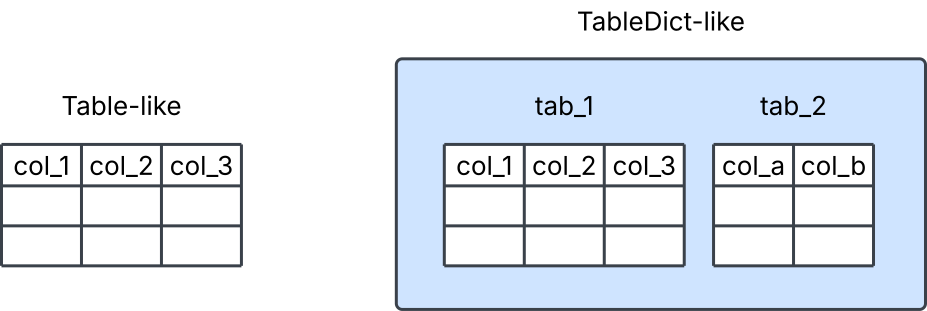
The main functions will take either of these objects as arguments, though some functions will only take one type of object. This is often specified in the function name itself.
The Table-like objects exist in memory as one of the multiple supported tabular formats. For example, they could be an astropy Table, or a dictionary of numpy arrays. TableDict-like objects also have a tabular format, which means that the Table-like objects they contain are all of that tabular format type. Supported tabular formats lists the available tabular formats.
Read
A file can be read in using the read function. Here’s an example of reading a table or tables from a FITS file:
>>> import tables_io
>>> tab = tables_io.read('filename.fits')
This reads the data to the default tabular format for the file type, which in this case is an astropyTable.
You can also specify a desired tabular format, in which case read will read the file to its native tabular format, then convert the Table-like or TableDict-like object to the desired format. You can see an example here. Supported tabular formats lists the default tabular formats as they correspond to the file types.
Note
In order to receive a consistent output when reading in objects, you can use read_native, which will always read in a TableDict-like object. That object will also always have the default tabular format for that file type.
To read in a file a chunk of data at a time, you can use the iterator function. This currently only works with a subset of the available file formats, which are listed in the function’s documentation. You can see an iteration example here.
Conversion and other functionality
The Table-like and TableDict-like objects can also be converted to different tabular formats separately, using the convert function. For example:
>>> import tables_io
>>> ap_tab = tables_io.convert(tab, 'pandasDataFrame')
Here we convert the astropyTable we created earlier to a pandasDataFrame.
Additionally, tables_io functions exist to concatenate and to take a slice of objects. More details on these functions and some examples can be found in the Cookbook section on basic table operations.
Write
The write function will accept both Table-like and TableDict-like objects to write to a file.
>>> import tables_io
>>> tables_io.write('filename.hdf5', tab)
'filename.hdf5'
Here, the type of file to write to is specified by the file name suffix, ‘hdf5’. If necessary, write will convert the object to the related tabular type, then write to the specified file type. Otherwise, tables_io has a native file type for each of the tabular formats, which are listed in Supported tabular formats. You can write files to their native format by using write_native directly.
Supported file formats
tables_io currently supports the following formats to read files in from and write to, with the associated suffixes:
File format name |
File suffix |
Produced by |
Available by default |
|---|---|---|---|
astropyFits |
‘fits’ |
||
astropyHDF5 |
‘hf5’ |
||
numpyHDF5 |
‘hdf5’ |
||
numpyFits |
‘fit’ |
||
pyarrowHDF5 |
‘hd5’ |
||
pandasHDF5 |
‘h5’ |
||
pandaParquet |
‘parq’ or ‘pq’ |
||
pyarrowParquet |
‘parquet’ |
Note
The file formats supported with the minimal installation are indicated in the ‘Available by default’ column. If you do not have the relevant package installed, you will not be able to create tables of that type (i.e. if you do not have pyarrow installed, you cannot convert objects to pyarrowTable or read in pyarrowParquet files.) See Basic installation for instructions to install the packages to support all the possible file formats.
Supported tabular formats
tables_io currently supports the following tabular formats in memory for Table-like or TableDict-like objects:
Tabular format name |
Actual format type |
Available by default |
|---|---|---|
astropyTable |
||
numpyDict |
||
numpyRecarray |
||
pandasDataFrame |
||
pyarrowTable |
As above, only some of these formats are available in the minimal installation, as indicated by the ‘Available by default’ column.
The table below shows which tabular formats are available for Table-like or TableDict-like objects, and how they are associated with the available file types. File types in the ‘File format for native read’ column will be read in to the associated ‘Tabular format in memory’. The default file that these tabular formats will be written to is given in the ‘Native written file’ column.
Tabular format in memory |
File format for native read |
Native written file |
|---|---|---|
astropyTable |
astropyHdf5, astropyFits |
astropyHdf5 |
numpyDict |
numpyHdf5 |
numpyHdf5 |
numpyRecarray |
astropyFits, numpyFits |
numpyFits |
pandasDataFrame |
pandasParquet, pandasHdf5 |
pandasParquet |
pyarrowTable |
pyarrowParquet, pandasParquet, pyarrowHdf5 |
pyarrowParquet |