Style Guide
Documentation
All documentation is created using Sphinx. The source files live in the docs/ folder, and the output is created in the _readthedocs/ folder in the main package. Documentation files are written in Markdown, and any images or other assets are in the assets/ folder. When new documentation packages are added, make sure to add them to the requirements.txt file, where they will be used when Read the Docs builds the documentation.
Writing Documentation Pages
When writing new documentation pages, make sure to add them to the relevant toctree in index.rst.
Tutorial Jupyter notebooks can be placed directly in the notebooks/ directory, and they will be automatically evaluated and turned into a webpage via the myst-nb extension.
Building the Documentation Locally
To build the documentation locally, for instance, for preview or to manually upload to a specified location, run the following from the docs/ directory with the appropriate conda environment activated:
# Remove any previous compiled documentation
make clean

# Make the HTML Documentation
make html
The HTML rendered documentation will live in the _readthedocs/html directory.
Understanding the code
tables_io is organized such that the main functionalities are made available in the main __init__.py, and additionally HDF5 functionalities are made available in the hdf5 module. The diagram below displays the main functions available and some of the most relevant HDF5 functions. For all of the available HDF5 functions, see the function overview of the HDF5 module.
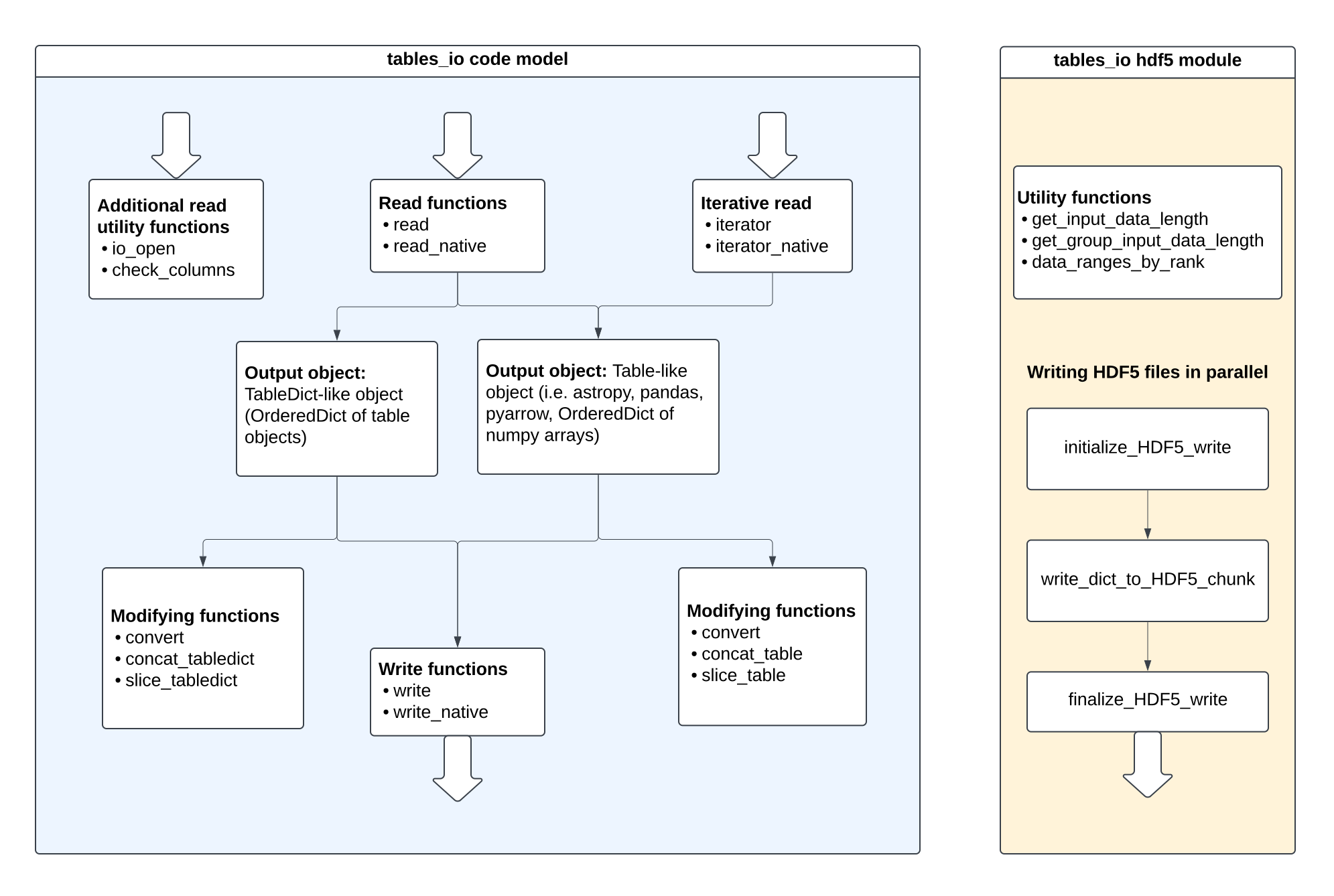
The code itself is split into three main components: io_utils, convert, and utils. io_utils contains all of the read and write functions. convert contains all conversion functions, and utils contains all functions related to slice and concat functionality, as well as code array utilities. types.py contains all the dictionaries relating table types and formats, as well as the functions that get information about what type a file or object falls into. lazy_modules.py handles loading in the necessary packages. See the diagram below to get a sense of the layout of the package.
tables_io
├── __init__.py
├── _version.py
├── cli.py
├── conv #conversion functions
│   ├── __init__.py
│   ├── conv_table.py
│   └── conv_tabledict.py
├── hdf5 #loads functions for chunked reads and writes of HDF5 files
│   ├── __init__.py
├── io_utils #io functions
│   ├── __init__.py
│   ├── iterator.py # functions related to chunked read
│   ├── read.py # functions to read in data from files
│   └── write.py # functions to write files
├── lazy_modules.py #handles loading of modules not required by installation
├── table_dict.py #deprecated
├── types.py #table types and format dictionaries and functions
└── utils/ # utility functions
├── ├── __init__.py
├── ├── array_utils.py # functions for handling array operations
├── ├── concat_utils.py # functions for concatenating tables and tabledicts
└── └── slice_utils.py # functions for slicing tables and tabledicts
Generally, the code files are formatted such that there are interface functions at the top of a given file. These interface functions then identify the input object types and call more specific functions, which are found further down in the file.
Expectations
Generally, the code should follow the guidelines given in the LSST DM Developer Guide. This section lays out some project-specific guidelines.
When creating new test files, they should be in the same location within the tests/ folder as the file that is being tested. The test file should have the name test_[filename].py, where filename is the name of the file being tested. For example, a test for the tables_io/conv/conv_table.py module is called test_conv_table.py and located in the tests/conv/ folder.
Naming conventions
Single table objects (i.e. a
pandasDataFrame,numpyDictof arrays) are referred to asTable-like.Objects that are
OrderedDictobjects ofTable-likeobjects are referred to asTableDict-likeobjectsFunction names should be in snake case (like_this)
Class names should use pascal case (LikeThis)
Typing Recommendations:
It is recommended to use type hints for the arguments and outputs of functions to improve the ability to develop and understand code. For some tips on how to get started see this cheat sheet.
Some tips for this project:
When referring to a generic
TableDictorTableDict-likeobject, use theMappingtype hint.Currently there is no good way to type hint
Table-likeobjects other than thenumpyDictobject.
Contribution workflow
The contribution workflow described here is pulled from the RAIL contribution workflow.
Issue
When you identify something that should be done, make an issue for it.
Branch
Install the code following the developer installation instructions.
If your branch is addressing a specific issue, the branch name should be issue/[issue_number]/[title], where the [title] is a short description of the issue, with _ separating words.
While developing in a branch, don’t forget to pull from main regularly (at least daily) to make sure your work is compatible with other recent changes.
Make sure that if the issue solves one of the items listed in Technical Debt, you remove that item from the documentation page.
When you’re ready to merge your branch into the main branch, create a pull request (PR) in the tables_io repository. GitHub has instructions here.
Several continuous integration checks will be performed for new pull requests. If any of these automatic processes find issues with the code, you should address them in the branch before sending for review. These include tests (does the code function correctly), Pylint (code style), and coverage (how much code is exercised in unit tests).
Once you are satisfied with your PR, request that other team members review and approve it. You could send the request to someone whom you’ve worked with on the topic, or one of the core maintainers of tables_io.
Merge
Once the changes in your PR have been approved, these are your next steps:
merge the change by selecting “Squash and merge” on the approved pull request
enter
closes #[#]in the comment field to close the resolved issuedelete your branch using the button on the merged pull request.
Reviewing a PR
To review a pull request, it’s a good idea to start by pulling the changes and running the tests locally (see Running Tests for instructions).
Check the code for complete and accurate docstrings, sufficient comments, and ensure any instances of #pragma: no cover (excluding the code from unit test coverage accounting) are extremely well-justified.
Feel free to mark the PR with “Request changes” for necessary changes. e.g. writing an exception for an edge case that will break the code, updating names to adhere to the naming conventions, etc.
It is also considered good practice to make suggestions for optional improvements, such as adding a one-line comment before a clever block of code or including a demonstration of new functionality in the example notebooks.
Version Release and Deployment Procedures
Publishing Package on PyPI
There is a Github Action that will publish the package to PyPI after a new release is created.
Making the Documentation on “Read The Docs”
Read the Docs is linked to the github repo, and will rebuild the docs when there are any changes to main. If there are any issues with this process, contact the project maintainer, Eric Charles.
Informing Developers of Downstream Packages
tables_io is a core package of the LSST DESC RAIL ecosystem. Consequently, the developers of the following packages should be informed about new versions: